
I’ve always had a question: Why do other DSLs claim to be several times faster than Triton? Where does that speed-up come from? Is it really that hard for Triton to achieve this performance?
I plan to answer these questions in a series. The series will include two parts:
- Triton’s internal compiler working principles
- More general kernel optimization strategies
At the same time, I’m developing my own DSL and compiler based on Triton: TeraXlang, with the purpose of:
- Adding analysis tools for the underlying workflow
- Optimizers to improve Triton performance
This toolset currently allows Triton to match FlashAttention in attention efficiency, and can also assist in implementing efficient MLA and NSA code. Supports Hopper and Blackwell.
(Welcome to check the repo https://github.com/deciding/txl, or run pip install teraxlang to install)
Lesson 1: Vector Add
Starting with the most basic example — Vector Add, the “Hello World” of GPU programming.
Code
import teraxlang as txl
import torch
import triton
import triton.language as tl

@txl.jit()
def add_kernel(
    x_ptr, y_ptr, output_ptr, n_elements,
    BLOCK_SIZE: tl.constexpr,
    bid: txl.bid = txl.bid(0)
):
    block_start = bid * BLOCK_SIZE
    offsets = block_start + tl.arange(0, BLOCK_SIZE)
    mask = offsets < n_elements
    x = tl.load(x_ptr + offsets, mask=mask)
    y = tl.load(y_ptr + offsets, mask=mask)
    output = x + y
    # Subtracting sum is an additional reduction operation to show how the underlying IR handles these ops
    s = tl.sum(output)
    output -= s
    tl.store(output_ptr + offsets, output, mask=mask)
Running Method
Modal cloud service ($30/month credit), code at docker/tutorials/vector_add.py in my repo.
The biggest benefit of using Modal is that you don’t need to install any other packages, just pip install modal — all installation happens inside the container. Also, you don’t need to worry about container creation taking time; it saves your container image and starts almost instantly next time (assuming no queue for B200).
After running, IR files (ttir, ttgir, llir, ptx) will be generated in the volume. My code automatically calls txl.tools.generate_htmls to generate the HTML viewer. This is why you need to install teraxlang.
Why Vector Add?
Because it’s the simplest entry point to understanding Triton’s workflow. Through this example, I can explain clearly:
- How Python code becomes TTIR
- How TTIR becomes TTGIR
- How TTGIR becomes LLIR and PTX
- What optimizations each step performs
Triton Compilation Flow
Python → TTIR → TTGIR → LLIR → PTX → SASS
Stage Overview
| Stage | Meaning | Main Work |
|---|---|---|
| TTIR | Triton Intermediate Representation | Type inference, basic operator fusion |
| TTGIR | Triton GPU IR | GPU-specific optimizations, shared memory allocation, warp synchronization |
| LLIR | LLVM IR | General optimizations, register allocation, loop unrolling |
| PTX | Parallel Thread Execution | Virtual ISA, thread-level parallelism, memory hierarchy |
| SASS | NVIDIA Assembly | Actual GPU instructions |
IR Viewer Tools
If you want to understand what each stage optimizes, you can visit TeraXLang IR Viewer, or open TeraXLang and select Tools → IR Viewer to compare optimized vs unoptimized code (supports ttir, ttgir, llir, ptx).
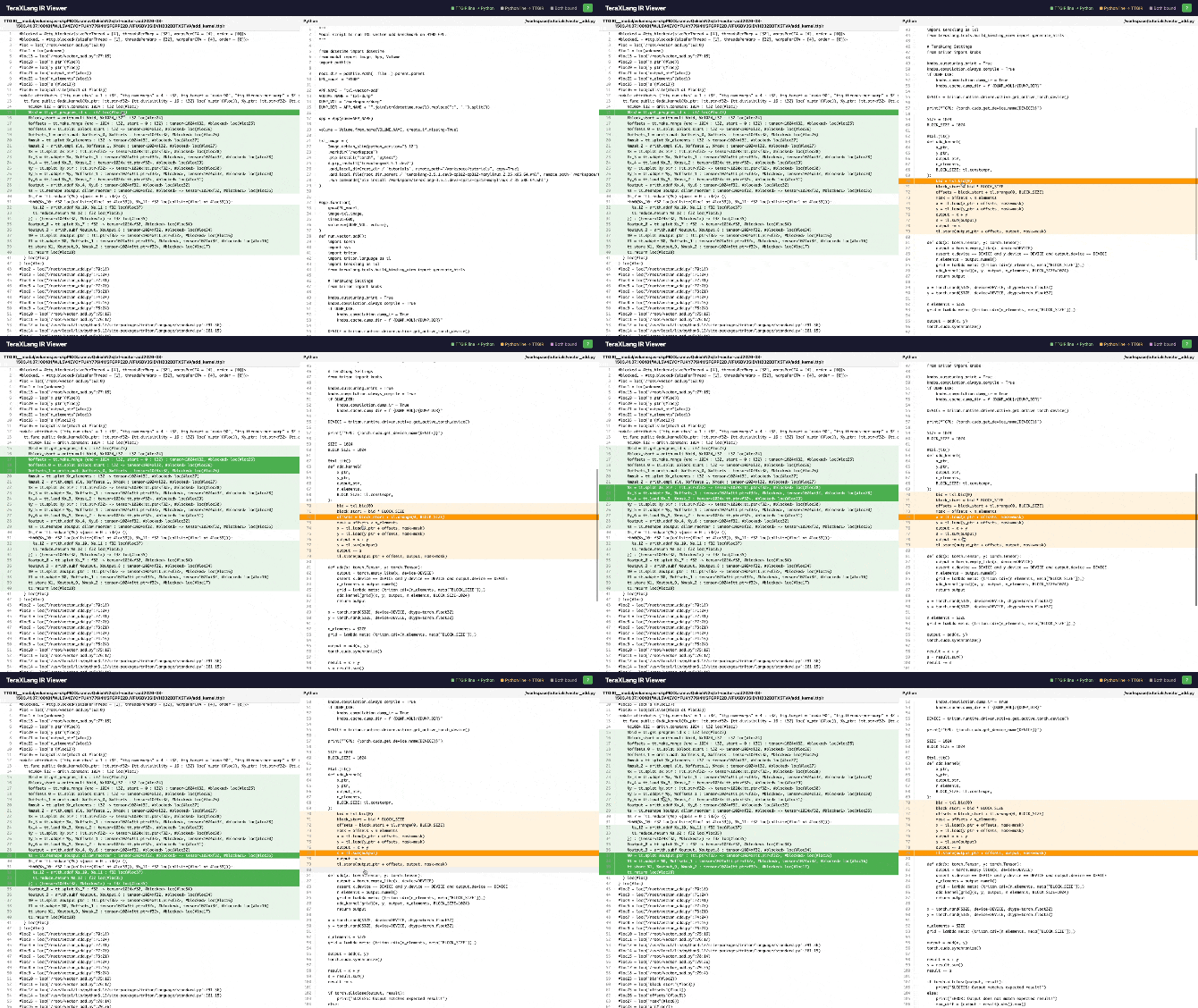
Viewing Diff
After running with modal, you can add parameters on txl.jit (formerly tl.jit) to see diffs:
@txl.jit(diff_mode='ttir', diff_select=0)
diff_mode can be ttir/ttgir/llir, and diff_select is the branch inside.
Terminology
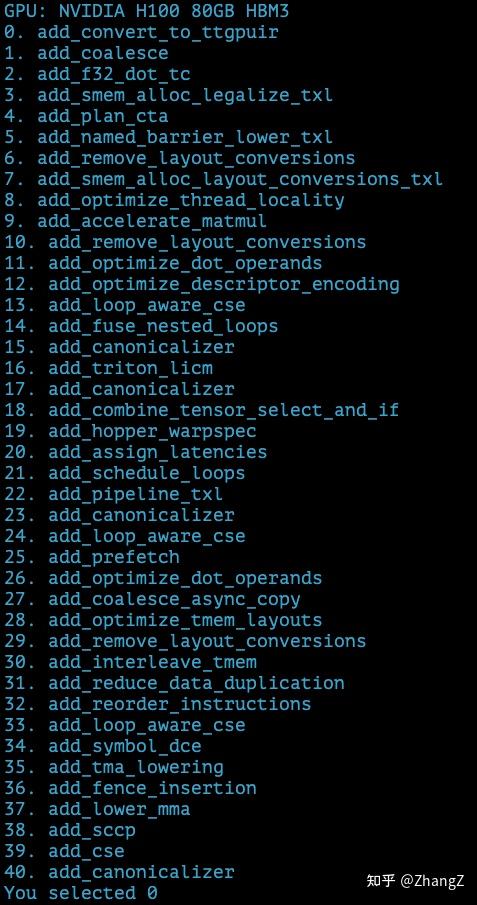
ttir/ttgir/llir are different stages in the optimization process, and each stage consists of multiple passes. For example, ttir includes these passes (those with txl suffix are unique to teraxlang):
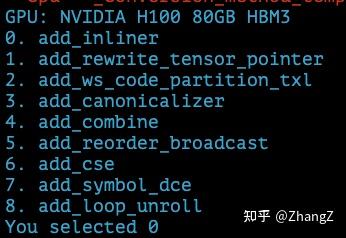
ttgir passes:
llir passes:
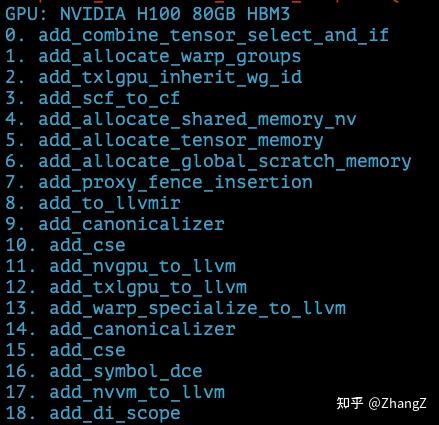
This feature is helpful because it outputs each specific pass — what exactly was optimized. For example, the first step of ttgir adds inferred layout information to each tensor (to be explained later):
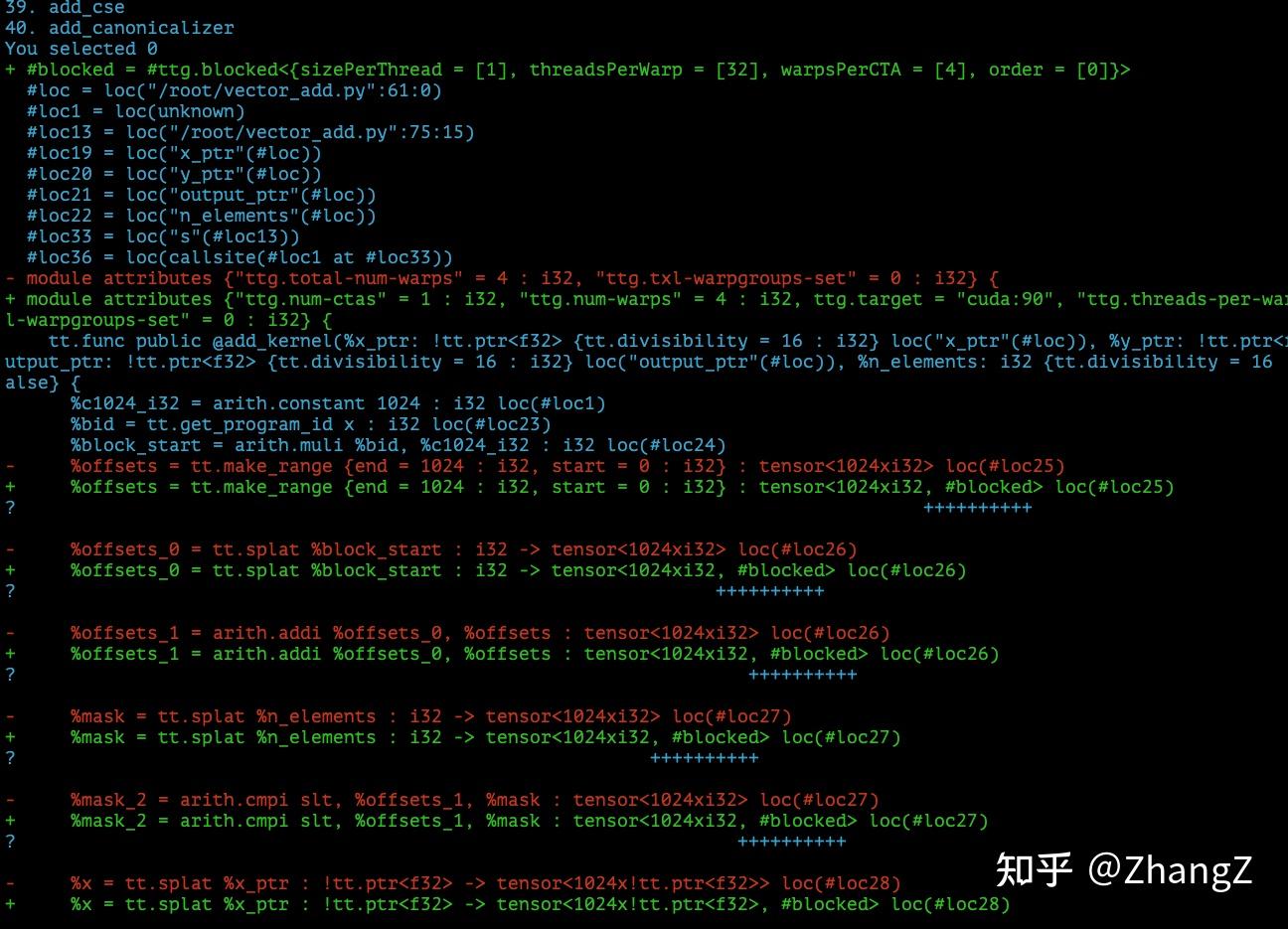
I hope this doesn’t scare everyone. Although there’s a lot of information, I’ll try to focus on the most important. And since this article is just the pilot of the series, I won’t jump straight into advanced content.
Actually, most passes are compiler optimizations, not specifically kernel performance optimizations — like Dead Code Elimination (DCE), Common Subexpression Elimination (CSE). Unless you’re like me and want to modify the compiler, you don’t need to know these.
Key Point: TTGIR
This stage is where Triton truly adds value:
- Placing data in shared memory
- TMA (Tensor Memory Accelerator) optimization
- Warp-level reduction
- Persistent kernel scheduling
Why is FlashAttention fast? Because it does a lot of manual optimization in the TTGIR stage (more on this later).
Tool Introduction
1. generate_htmls
Automatically scans all IR files in a directory and generates an HTML viewer:
python -m teraxlang.tools.build_binding_view <ir_directory> <py_source_file>
Supports: .ttir, .ttgir, .ptx
2. Online IR Viewer
Web version, no installation needed, just upload IR files directly: deciding.github.io/txl/tools/ir-viewer.html
Or go to TeraXLang and click IR Viewer.
Features:
- Drag & Drop upload
- Left panel: IR code, Right panel: Python code
- Click any line to jump to corresponding binding
- Green line = IR bound to Python, Orange line = Python bound to IR
This tool is especially useful for analyzing the compilation process. For example, if you want to know what PTX a line of Python code corresponds to, just click and see.
Vector Add Demo
After running modal run docker/tutorials/vector_add.py, you’ll see output like this — three HTML files generated:
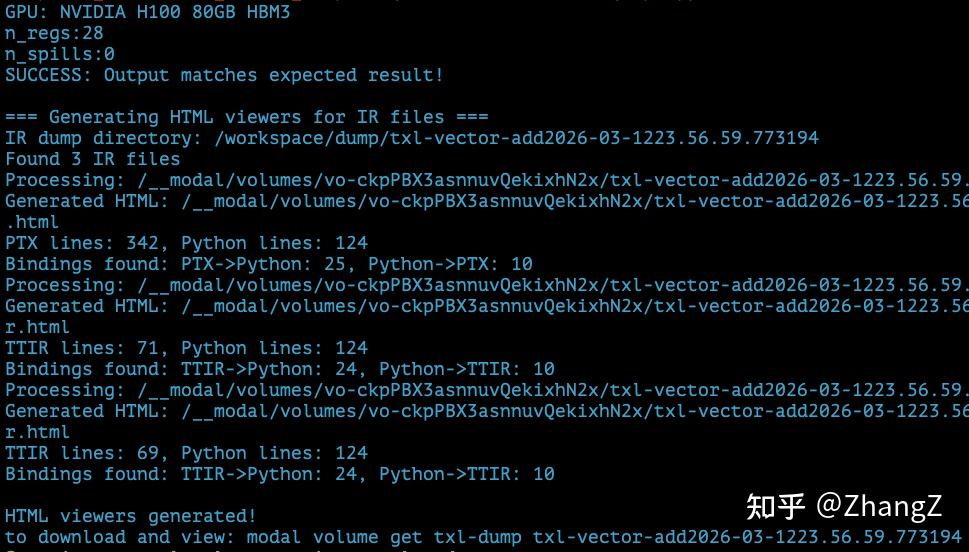
But the files are still on the cloud. Use modal volume get {VOLUME_NAME} {DUMP_DIR} to download them.
Let’s open the file ending with viewer_ttir.html:
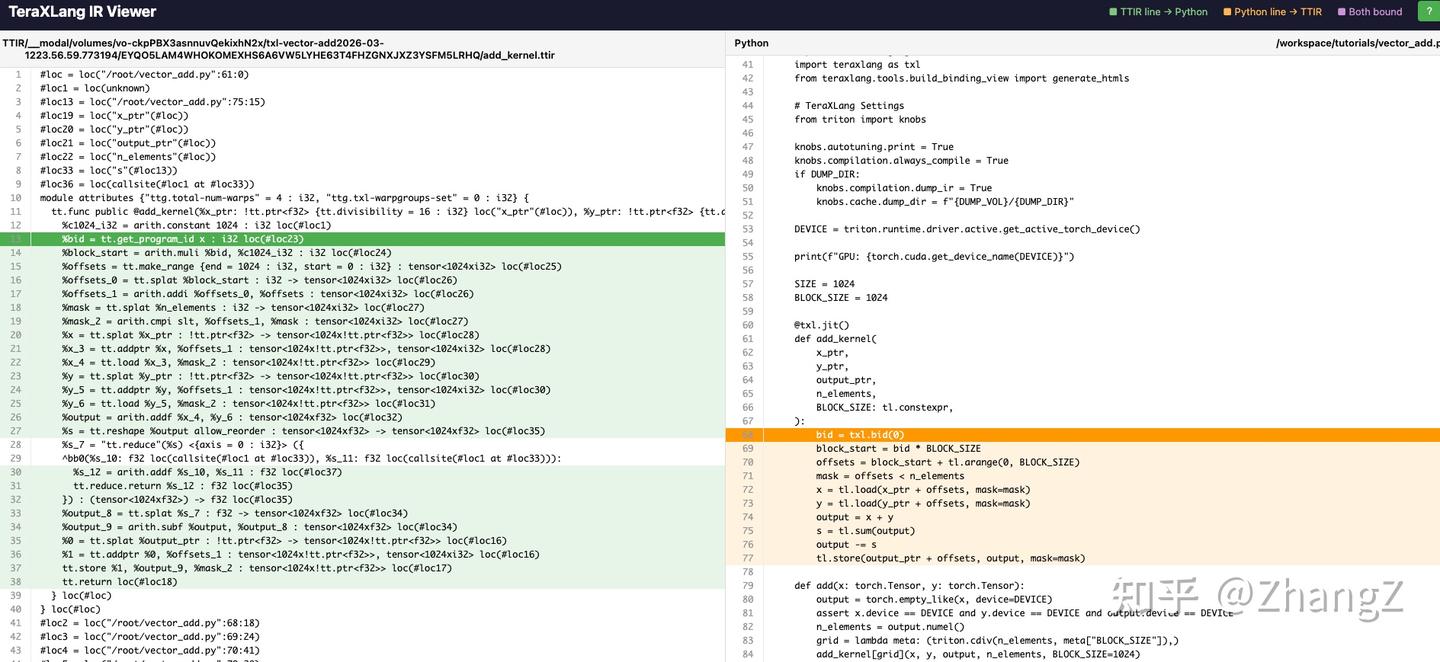
The colored lines show ttir ↔ py correspondences. Click to jump to the corresponding line. This way you know what Triton code gets converted to. The reverse is also useful — some advanced kernels can expand to hundreds or thousands of lines; clicking lets you directly see which line of Triton it corresponds to, making debugging easier.
For example, tl.load(y_ptr + offsets) corresponds to this ttir:

splat distributes one ptr to the entire 1024-length vector, addptr adds the offset to each element’s pointer, then load reads the data from those pointers.
Let’s switch to the ttgir HTML:

You’ll notice the same tensor type has an extra #blocked annotation. This #blocked is actually the name of a layout variable, indicating this tensor has a defined layout, defined in a variable called blocked. The specific definition is at the file header:

There are two layout variables, blocked and blocked1, both of type ttg.blocked (in Triton C++ code the type is BlockedLayout). Triton has several layouts like NVMMASharedLayout for mma operands, SwizzledSharedLayout, etc. BlockedLayout is simpler — from the definition you can see: blocked is distributed across 4 warps, each with 32 threads, each thread storing 4 registers.
Careful readers might notice一个问题: the vector length is 1024, but according to the blocked definition, it only stores 4x32x4=512 values. Where is the other 512?
This brings us to the ptx file:
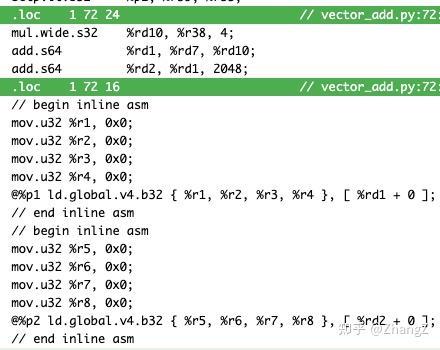
The data loading here uses ld.global.v4 — loading 4 values at a time. This corresponds to why blocked’s sizePerThread is 4. If it’s not fully divided in one load, each thread loads again — that’s why there are two ld.global.v4 statements.
The blocked definition doesn’t necessarily cover the entire vector; it just defines a slicing method that can automatically scale to the entire tensor.
Can This Tool Work with cuteDSL?
Try running modal run docker/fa4_benchmark.py:
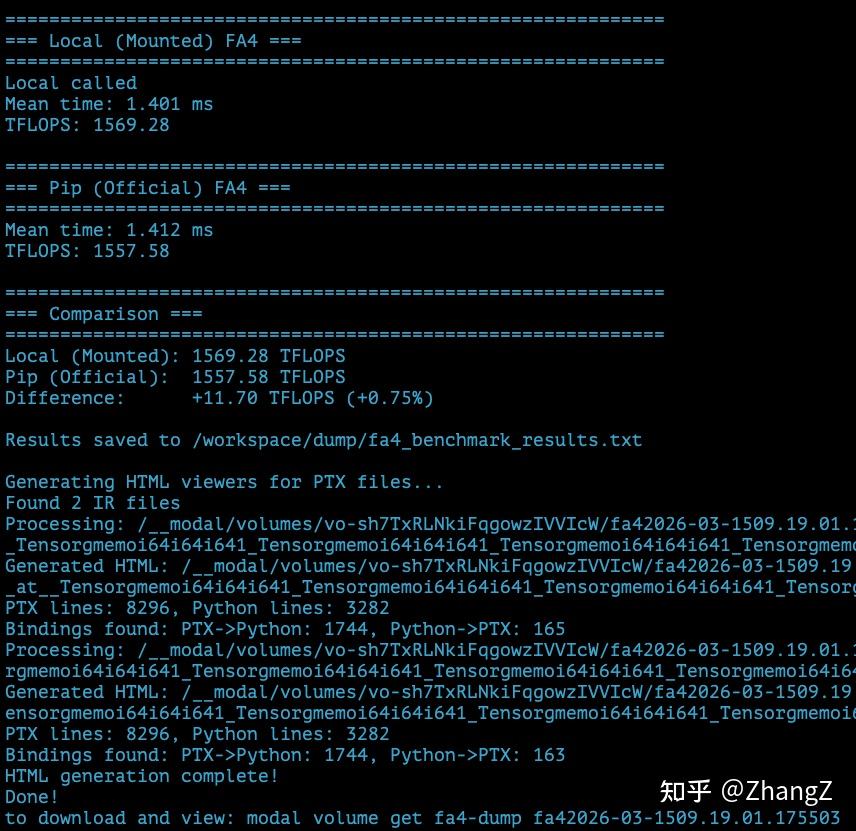
To open the HTML, use the one starting with cutlass___call___flash_attn_local... — the one with “local” in the name, which is the tunable FA4 py file.
Then you can jump between fa4 and ptx:
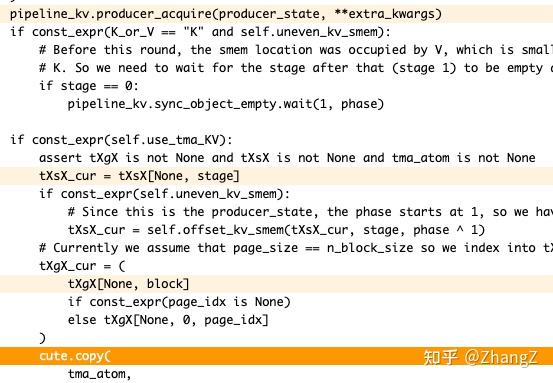
But there’s a problem: cuteDSL’s optimization level is too high. Even with only O1 enabled, Python mappings are very hard to find. Something helpful I found: for example, this line cute.copy:

When I write compilers, I rarely pay attention to L2::cache_hint — how much performance impact does this have?
Future Content Plans
Matmul
- How to write persistent kernels
- Warp-level tiling
- When to use swizzle, when not to
- Where does the performance gap with cuBLAS come from?
Flash Attention
- Differences between FlashAttention, FlashAttention2, and FlashAttention3
- Pitfalls in Triton implementation
- How to exceed FlashAttention3
- Understanding FA4
MLA (Multi-Latent Attention)
- KV cache compression
- Where are inference performance bottlenecks?
- How to design hardware-friendly layouts
NSA (Native Sparse Attention)
- Dynamic sparse patterns
- Block sparsity vs token sparsity
- Special optimizations on Hopper
Summary
Goals of this series:
- Understand what each stage of the Triton compiler does
- Understand the essence of GPU kernel optimization
- Learn to use tools to analyze IR binding relationships
- Gain the ability to independently optimize high-performance kernels
- Introduce my profiler tool
I plan to explain Triton’s optimization principles through this toolset, and how I modified it to compete with CUTLASS cuteDSL. For comparison, I’ll also release a cuteDSL beginner’s guide. The ultimate goal is to explain CUDA kernel optimization from more angles and higher dimensions.
See you in the comments!
Related Resources
- Triton Official Documentation: triton-lang.org
- TeraXLang: github.com/deciding/teraxlang
- Modal: modal.com